
Aug 4, 2020
How To Get a Freelancer Subsidy of Up to One Million Yen
If you have a small business or are working as a sole proprietor in Japan, you might qualify for a government subsidy program. It has been created to help small businesses with income lost due to Coronavirus this year.
Considering that most public spaces closed for a few months in spring, maybe you qualify for this.
For example, when I file taxes, this is claimed as freelance or independent contractor income.
Be careful if you are not claiming small business income - if you didn't report the income on your taxes for last year, this subsidy isn't for you.
First step, if you have a small business of your own in Japan, check this website in English and make sure you qualify.
This site also has all the links and info you need, plus more about support due to lost income this year.
You'll need to have at least one month this year where your total income was 50% or less than last year's income from the same month. There is a formula towards the bottom of the page that will help you calculate the amount you would be able to receive as a subsidy.
At first I misunderstood - for X in the formula below, they're looking for the total amount of income reported on last year's taxes, regardless of how much of that income has been affected this year by Coronavirus.
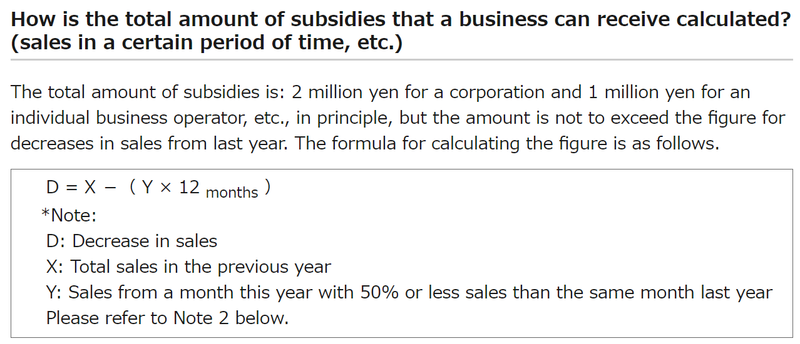
(Screenshot: Ministry of Economy, Trade and Industry (METI))
I thought I could qualify based on only my work as a freelancer. In fact, I need to calculate based on the total income from my part time jobs too. I didn't lose any work this spring at one of those jobs, so I don't qualify after all.
If you qualify for a subsidy, proceed to the next part.
Fill out the application and submit your documents. There is no Japanese website for this, but in most cases it can be done online.
This is the online application page. I used Weblio quite a bit for the legalize part that I wanna make sure I get the gist of properly, but if you can read Japanese decently, it's not bad. If you have a Japanese partner or friend who can help, it's more efficient. I only asked for help twice to double check and my Japanese isn't great. I should have asked for help about the qualification part before proceeding though!
Before you start, you'll need files ready to go that you'll upload later.
There isn't a button to save and come back later, so it's better to have some time set aside to work through this.
1.) last year's tax form (there are two files for most freelancers),
2.) your sales account book for the year (assuming whatever works, I made a PDF of my relevant Excel file.),
3.) a copy of your bank book (front cover plus inside first two pages - two separate files), and
4.) proof of identity, which is both sides of a zairyu card for most of us.
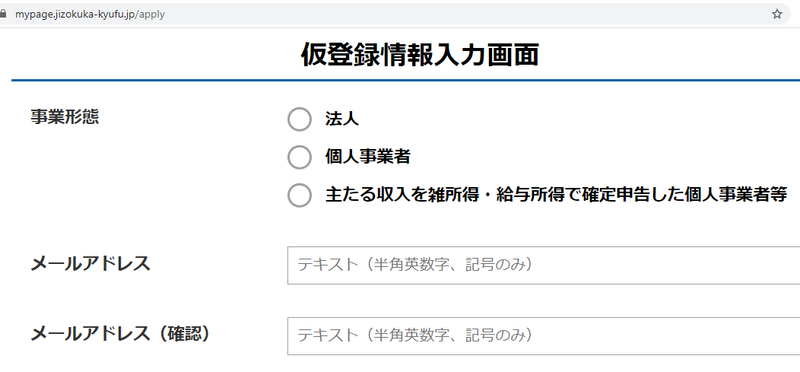
Steps for the online application:
Page one (above photo) is your type of business, your email address and agreeing to terms.
Page two is checking that you have required documents, mentioned above.
Page three is creating a login and password after confirming your email address.
Page four is agreeing to the 'oath.' This is the part I translated. Essentially it's agreeing that you meet the requirements, are up to date on your taxes, etc., don't enter false info, agree to any investigations and will return the subsidy if you made stuff up, your income isn't gang related, and you'll follow the payment regulations.
(Because the subsidy is a type of income, you'll be expected to pay taxes on it for this year.)
You'll want to check all the boxes.
Page five is your basic info like name, address, and industry type. Note that your name should match your name on your bank book, on the inside page.
Page six is where I got stuck. There are so many choices.
The first one, general application, should be fine in most cases. At the bottom you'll want to confirm if your name matches on your bank book and taxes or not.
Page seven asks if you file a 'blue' or 'white' tax form. Then you'll enter your calculations (similar to the formula in the top picture) and bank info.
This was a little strange but first you enter the bank number (it's next to the bank name on your bank book) and then click to show a list of all the branches. Next find the branch on your bank book and select it.
Page eight is attaching your tax documents and ID.
Page nine is checking that everything looks good, then you can click on submit!
From there you can log out and you'll get a confirmation email with an application number.
As long as everything goes fine, the amount will be deposited into your account in a couple weeks.
After submitting the application, I got an email asking me to make corrections. Then I realized I didn't qualify at all... Ooops!
Has anyone already done this? Are you gonna do it now?


0 Comments